


Product tour

Five minutes inside Kwilo.

The screens you'd actually use, on the device you'd actually use them on. Phone for the on-site stuff, desktop for the books.


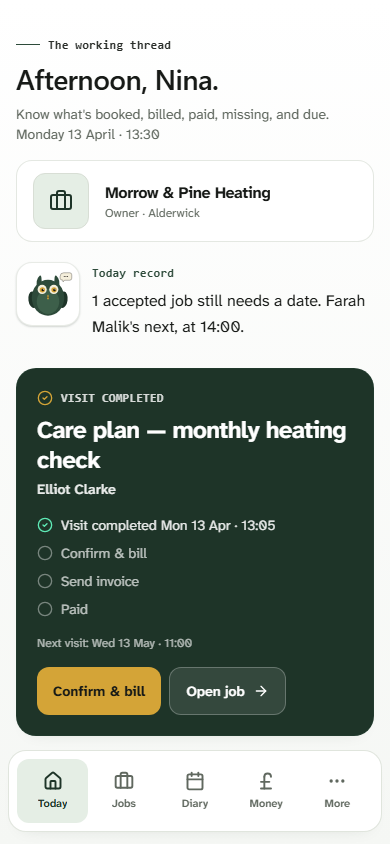
Kwilo Today screen
01Today

Open the app. Know your day.

What's on, what's overdue, what's been paid. No five-tap dig to the thing you actually wanted.

  • Coming-up timeline shows the next job and where it sits
  • See what's owed and what still needs an invoice
  • Tap once to start the day, mark a job done, or add an extra
Kwilo Voice quote screen
02Voice quote

Quote wherever you are.

Hold the mic, talk the job through in your own words. I draft the line items, prices and total while you walk back to the car — or into your next meeting.

  • Voice-to-quote in roughly 90 seconds
  • Customer approves on their phone — no PDFs, no chasing
  • Quote rolls straight into a job once they say yes
Kwilo Jobs screen
03Jobs

Every job in one list.

Status tags tell you what needs doing. Stale quotes, ready-to-invoice work, follow-ups — all sorted before you've finished your tea.

  • Filter by what needs your attention next
  • Status flags catch quotes going cold and extras awaiting approval
  • One click from list to full job — no hunting
Kwilo Money & MTD screen
04Money & MTD

Quarterly figures, ready when HMRC are.

Income and expenses categorised as you work. The MTD checklist tells you exactly what's missing, and the file-to-HMRC button is right there.

  • Live tax-set-aside figure so the bill never surprises you
  • Quarterly checklist with anything still needing a category
  • Files direct to HMRC — no spreadsheet middleman
More inside

A few more screens from inside.

The bits you'll live in once you're set up — your jobs list, your week, your money page.

Kwilo mobile jobs list

Jobs · mobile

Every job, status-tagged. Stale quotes and ready-to-invoice work shout for themselves.

Kwilo mobile money screen

Money · mobile

Quarterly figures and tax-set-aside in your pocket. File to HMRC from anywhere — café, kitchen, kerbside.

Kwilo desktop diary week view

Diary · desktop

Your week at a glance. Booked, quoting, in progress — and where the gaps are.

Built for the phone in your pocket

Every screen above works one-handed. The desktop views are for evenings and weekends — but you don’t need them to run the day.

Seen enough?

Try it on a real job this week.

30 days free. No card to start. Stop any time.

See pricing